
Before you start
You’ll need edit access to a research workspace, Isaac Sim, the OpenVLA training recipe and an available CUDA GPU. With viewer access, you can follow a colleague’s saved scene and run records.
Build the scene
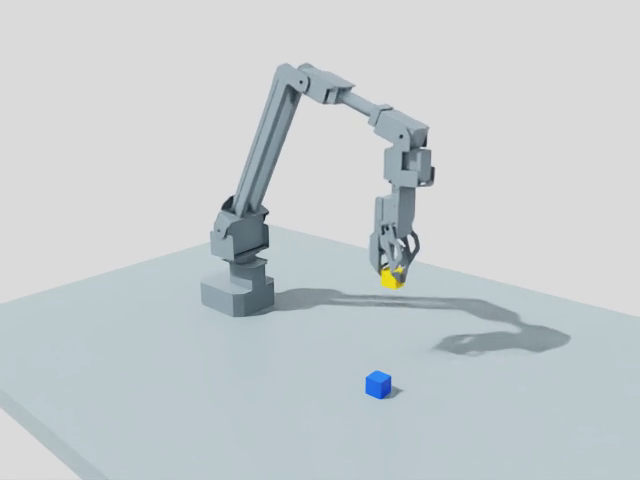
- Open Simulation → Scene editor → New scene. Name the layout, add a Table platform, and place a RoArm-M3 and a Yellow cube on the table.
- Orbit the view to check the cube’s height and distance from the gripper. The transform inspector accepts positions in metres and rotations in degrees. Choose Save scene to create a revision.
- Under Scene simulation, select Isaac Sim → Physics preview → Run simulation. Check the simulator frame for a visible arm and cube. The editor and the simulator have separate cameras.
For the lab engineer. Keep the scene revision with your notes. Editing a placement and saving again gives the next run a different starting layout.
Record demonstrations
- In the saved scene, choose Record robot demonstrations. Select the robot and the yellow cube grasp task, then choose Run simulation.
- Watch the live simulator frame. After the run finishes, open its replay and report. Inspect the grasp outcome and the number of episodes available for training and validation.
- Return to Run history → Scene recordings to retrieve the run. Keep its recording ID together with the scene revision.
Inside a sample. Each camera frame shows what the robot saw just before a command. Its paired action records the ensuing tool displacement, rotation and gripper state.
Train a checkpoint
- Select the completed demonstration in scene training. Confirm the training and validation episode counts, then choose Fine-tune OpenVLA.
- Under Compute allocation, select an available GPU and a wall time limit. Start fine-tuning and open the training run to see optimizer steps arrive.
- Reopen the job from Training → Manage runs. When it completes, inspect the published checkpoint, its parent model, the source recording and the final metrics.
For the model developer. Training loss describes the fit to the training samples. To measure action prediction on unseen frames, run the Scene Studio · held-out motion benchmark on the checkpoint.
Evaluate the policy
- In the same saved scene, choose Test a trained policy. Pick the policy robot and the new checkpoint. Check the source recording and checkpoint hash before launch.
- Choose Run policy test to watch the simulated camera and decision counter. The policy receives a fresh image as it acts. The completed evaluation gets its own run ID and replay.
- In Run history → Scene recordings, select Policy test. Open the report beside the replay. For a grasp, inspect the recorded contact, lift height and hold duration against the task criteria.
For the reviewer. A finished run can record a failed grasp. When comparing checkpoints, use the same scene revision and evaluation conditions, keep failures and interruptions, and report how many trials contributed to the result.
Workcell Loop
Recorded grasp study · 26 November 2026. Could an OpenVLA policy trained from a simulated tabletop grasp transfer to a new cube position? Follow the recorded checkpoint from the camera observation to the decision about the robot.
- Capture. The simulator supplied aligned 640 × 480 color and depth. The marked cube pixel at (217, 342) measured 704 mm from the camera.
- Reserve the test layout. The reference demonstration supplied 72 training samples. A second layout supplied 36 validation samples. A third layout, variant-003, stayed outside both sets.
- Train. The RTX 3090 completed 100 LoRA updates. Validation action error fell from 0.689 to 0.174, making the adapted checkpoint a candidate for the closed-loop test.
- Evaluate. In the one held-out MuJoCo trial, the gripper never held the cube between both fingers. The cube remained in contact with the table for all 500 hold steps. The grasp failed.
- Review handover. The failed evaluation blocked physical release. The experiment recorded zero physical trials. Its contact measurements are the evidence for the next revision.
- Inspect the station rehearsal. A separate software test passed a synthetic image to the same checkpoint. It returned seven normalized action values in 805.9 ms. The test exercised the model interface with hardware disconnected.
Play the recorded case →Training and evaluation receipt ↗Station rehearsal receipt ↗
Prepare deployment and return the observations
- Open World transfer → Evaluation & handover. Select the frozen checkpoint’s held-out run and record the simulation evaluation. Open its replay and contact measurements to check the verdict.
- After a recorded pass, select the registered arm, check its matching calibration and prepare the handover package. The package identifies the checkpoint, scene, evaluation and target device.
- On the commissioned workcell, the onsite operator reviews the package and supervises the trial. Enter its measured outcome, observations and trial receipt as physical evidence. A failed or interrupted trial remains part of the record.
- Use the saved observations as a reference for a new world family. Keep that family and its new training split linked to the trial that prompted the change.
Example status. The archived checkpoint failed its held-out grasp. Physical validation remains pending. The station rehearsal records the model response separately.
RoArm-M3 grasp replay
This archived experiment follows a separate RoArm-M3 grasp in Isaac Sim 5.1.0 with PhysX on an RTX 3090. The gripper lifts the yellow cube and holds it while the blue cube stays on the table.
| Measure | Result |
|---|---|
| Simulator verdict | Grasp passed |
| Minimum lift during hold | 91.52 mm |
| Bilateral finger contact | 240 of 240 physics steps |
| Hold time | 1.0 s |
| Table-contact steps during hold | 0 |
| Physical motor commands | 0 |
Lab evaluation report
24 November 2026 · OpenVLA on LIBERO Spatial. Four training episodes produced a 12-update LoRA adapter. The offline comparison reserved one episode from each of two tasks and used the same six held-out frames for both models.
| Measure | Base | Adapted |
|---|---|---|
| Valid action vectors | 6/6 | 6/6 |
| Matching action tokens | 5/42 | 6/42 |
| Gripper agreement | 5/6 | 6/6 |
| Translation RMSE | 0.4083 | 0.3884 |
| Rotation RMSE | 0.1051 | 0.0895 |
The error units are the native controller coordinates. In closed-loop simulation the adapted checkpoint completed 0 of 2 bowl placements. The bowl started between the plate and ramekin in the first trial and at table center in the second. Both trials reached the 220-command limit.
Evidence fingerprints
Held-out action log · SHA-2565d7420da18492b5781dfa6b5c373d7d0a22fa10bcb8ae0e46ddb74e80582ef9d
Closed-loop report · SHA-256f5642c6072f0b1e2a320d14180cd75f0b4022efad5ec0f70c2e3c56f3f1a17b5